JobBring puts a floor visualizer and a bid builder on your phone. The homeowner sees their own garage finished in a real product colour, and you send a priced bid they can accept from the driveway.
Free for 7 days in the app, no card. Plans from $39 a month, month to month. See pricing
Real screens from the app, shown with a sample business.
BeforeAfter
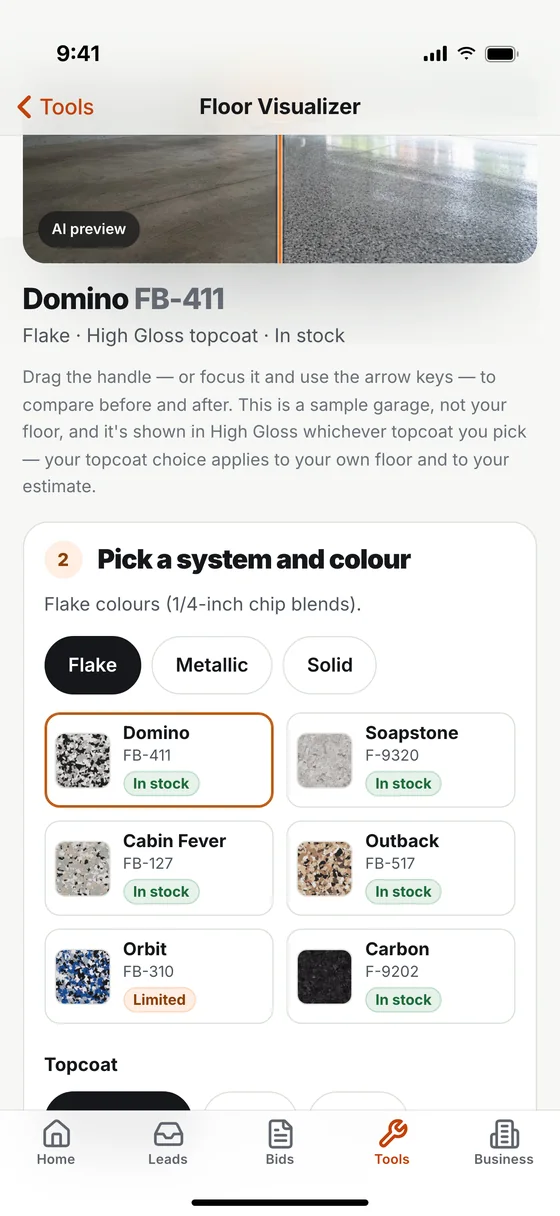
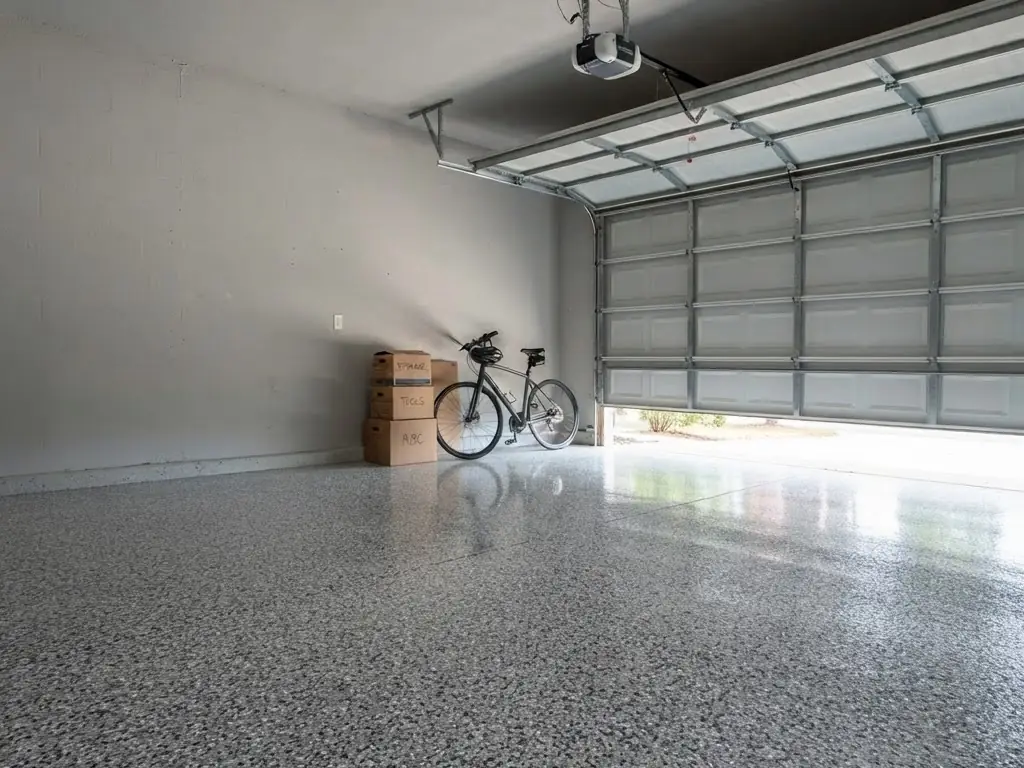
Domino FB-411Sample garage. Real product colours.
Try it here
This is the part they remember.
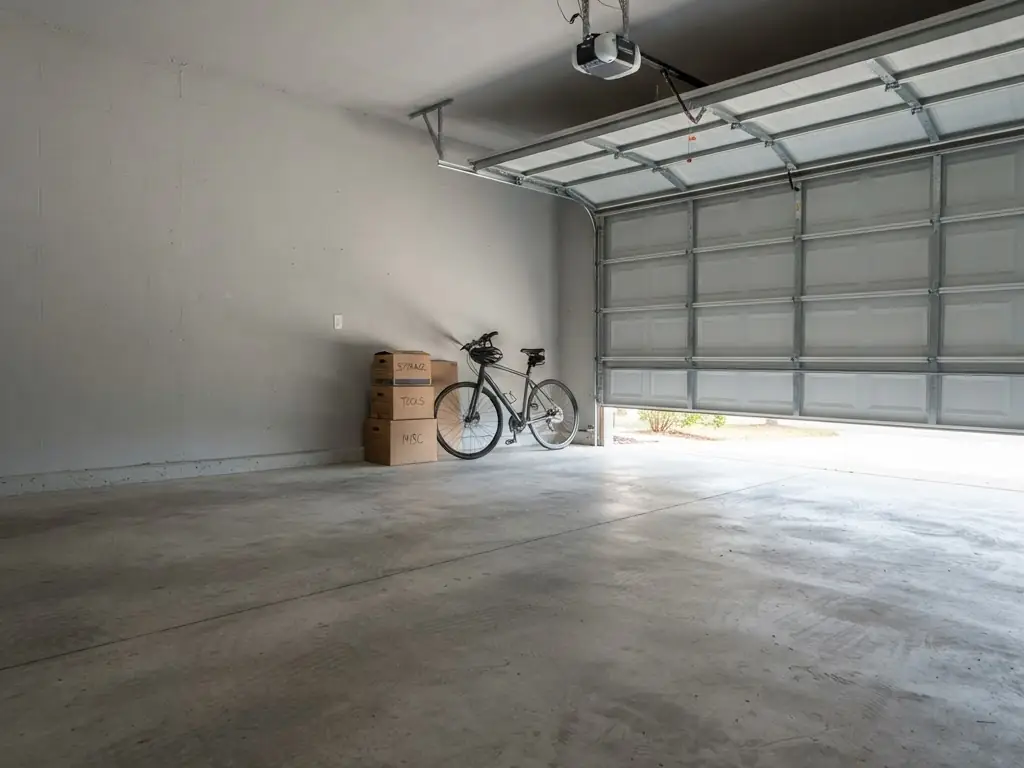
Drag it. That is what the homeowner does on your phone, standing on their own bare slab, before anybody says a number. Tap a colour to change the floor.
These are pre-rendered previews on a sample garage. On a real visit the floor in their own photo is coated, in about fifteen seconds, and nothing else in the picture moves.
Four screens. Two are yours, two are the homeowner's. Nothing gets typed twice.
On the driveway
Show the finished floor
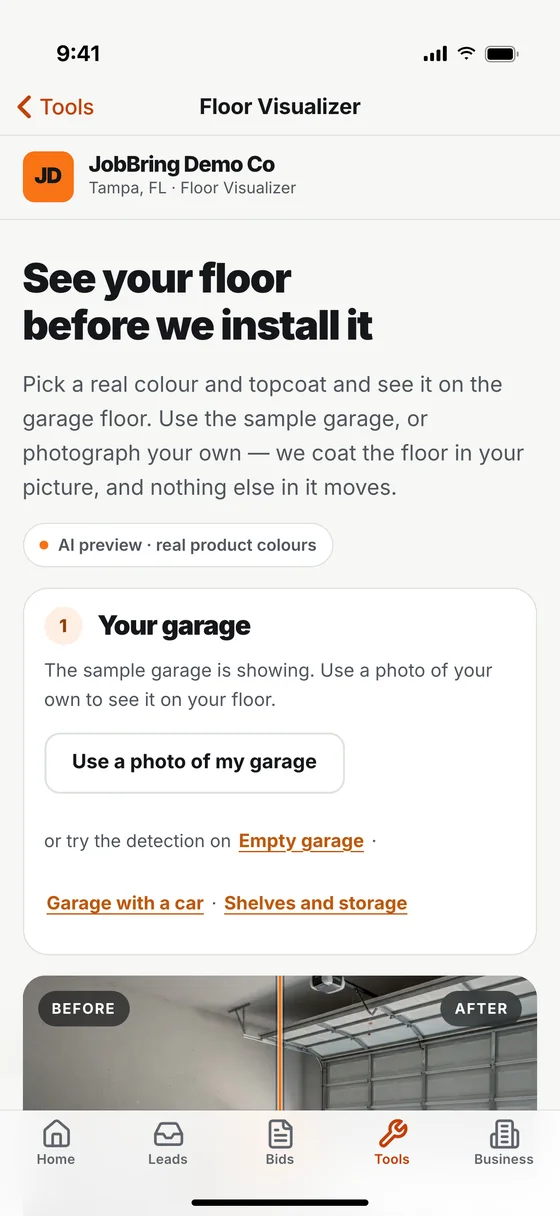
Photograph their garage or use the sample one. Pick a system, a colour and a topcoat. They drag between the bare slab and the finished floor themselves.
The homeowner
They ask for a price
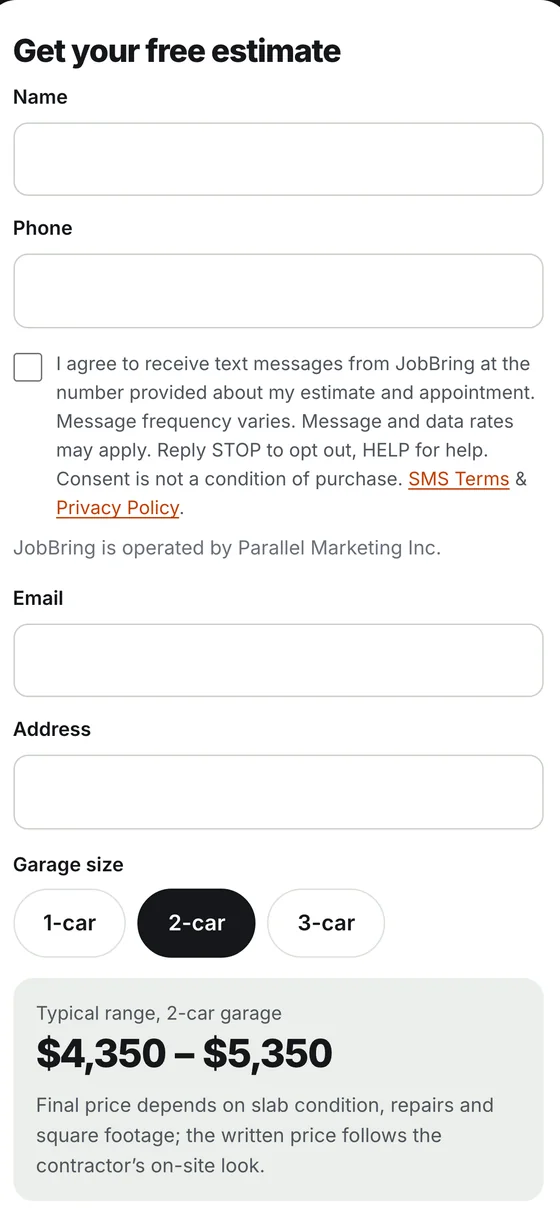
Name, phone, address and garage size. They see a typical range for that size, clearly marked as a range, never a quote. The firm number comes from you.
You
The lead is waiting
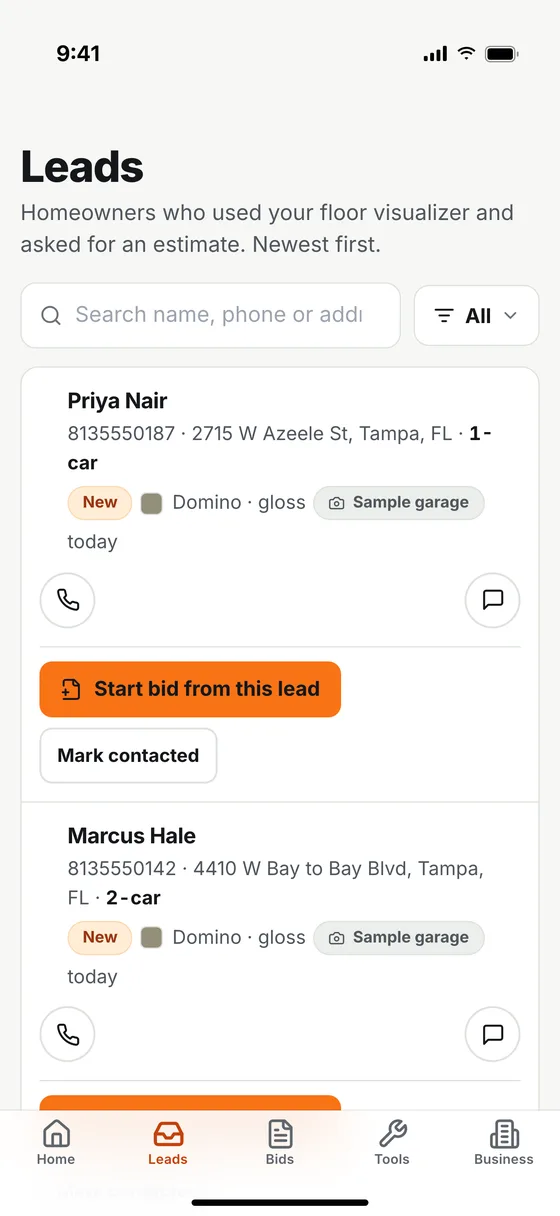
It lands in your leads list with the address, the car count and the colour they picked. Call or text from the row, or start the bid straight from it.
Them, again
The bid they can accept
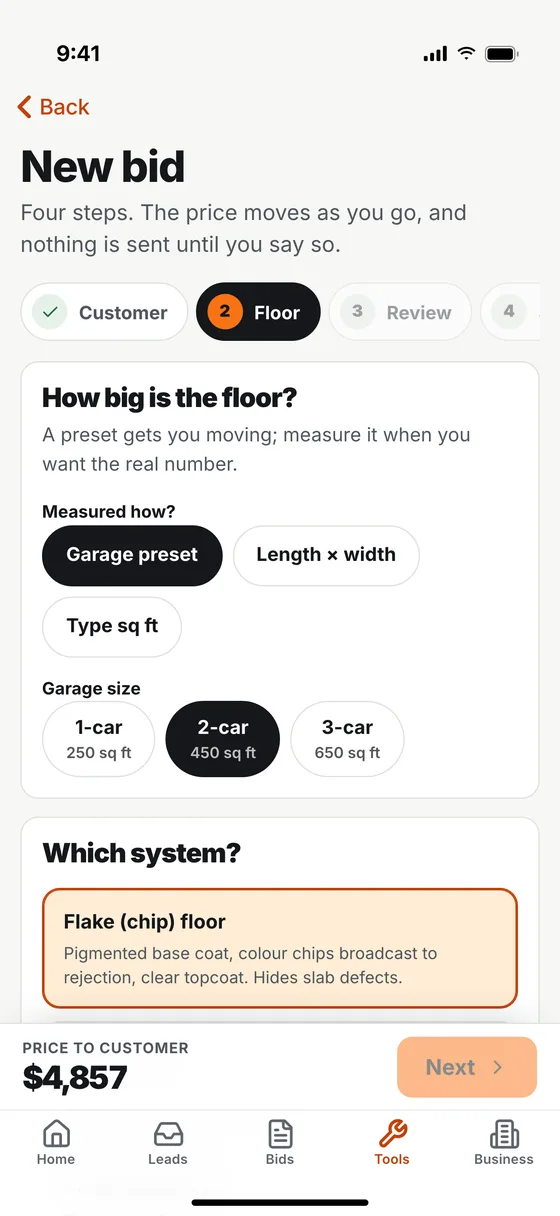
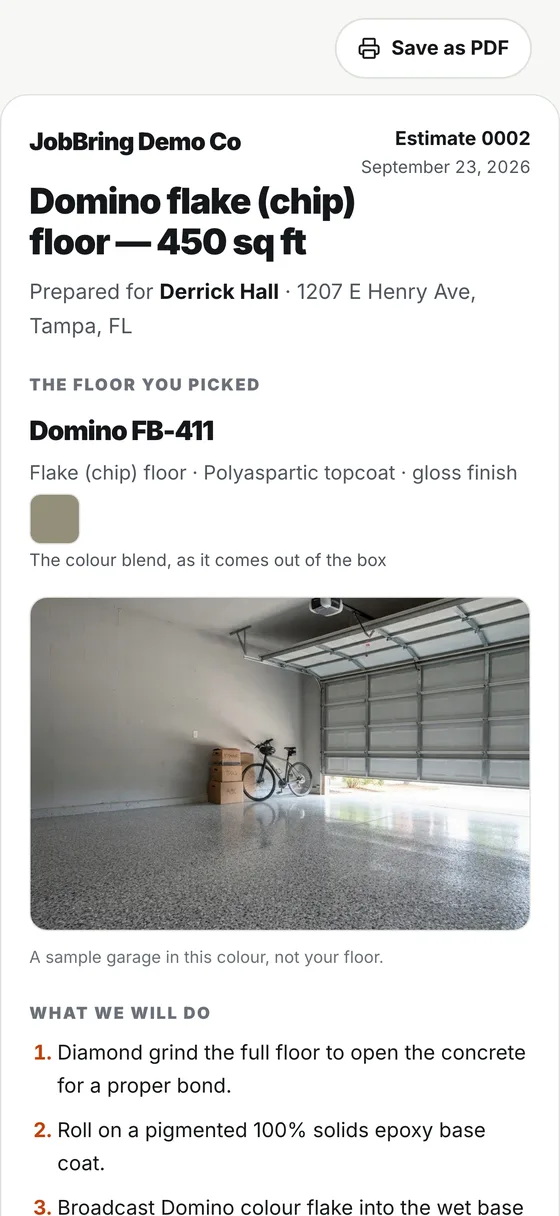
Materials, labour, tax and your margin are figured from your own settings. They get a clean page with the scope, the price and the deposit, and accept it on their phone.
Swipe for all four steps.
Real screens from the JobBring app and the public visualizer, shown with a sample business and sample customers.
A day in the life
One Tuesday, two ways.
Same contractor, same jobs. The difference is what is in his pocket.
Estimate visit. You hold up a chip sample and describe how a two-car garage will look in flake. They say they will think about it.
They stand on their own slab and drag between bare concrete and Cabin Fever on your phone. They switch to Outback, then back. You both know which one it is.
Measurements go on a notepad. You promise a number tonight.
Square footage in. Materials, labour, tax and prep are priced from your own rates. You check the margin on the private panel and send the bid before you start the truck.
The quote you promised is still in your head.
Your bids list shows the bid was opened. You know who to call back first.
Someone from a counter flyer wants to know what a garage like theirs would look like. They will wait for you to call.
They open your visualizer link, pick a colour and ask for a price. The lead is in your list with their address and their colour before you are off the ladder.
Kitchen table. Three quotes to type up from your notes.
They went out this morning. The evening is yours.
WithoutWith JobBring
The tools
What you do, what they see, what it costs.
Each tool works on its own. Buy the one you need.
Live in the app
Floor Visualizer
Their own garage, finished in the colour they are deciding on. The guess goes out of the conversation.
You do
Take a photo of the slab or open the sample garage. Brush in any part of the floor the detection missed.
They see
Their floor coated in about fifteen seconds. Flake, metallic and solid systems with real product codes, and a high gloss, satin or matte topcoat.
You get
Every homeowner who asks for a price arrives as a lead, with the colour attached.
It costs
$49 a month. 150 renders included, up to 10 per visitor, extra renders $15 per 100.
Bid the job before you leave the driveway, with your margin in front of you and never in front of them.
You do
Enter the square footage, the system, the colour and the topcoat, or start from a visualizer lead where most of it is already filled.
They see
A clean page with the scope, what the price covers and does not, the price and the deposit. They accept it on their phone. Nothing is charged at that point.
You keep
Cost, gross profit and margin on a private panel. Coverage rates start from industry-standard figures and every one can be replaced with your own.
It costs
$39 a month. With the visualizer, $79.99 for both.
Built to catch the call you could not take: it replies, asks what the job is, gives the range you set and asks for a preferred visit time for you to confirm. You get the caller's details, by the route agreed at setup, when you are off the ladder.
Where it stands today: it is set up one business at a time, subject to availability. Texting is enabled separately, only after carrier registration is approved and texting setup is completed for your business number. We help with that, but we do not guarantee approval or a date. Voice billing begins the day your line is turned on, even if texting is not on yet. Email us and we will tell you where setup stands.
$129 per month
You put a card on file when you sign up for setup. The monthly charge starts the day we turn your line on.
Voice greeting says it is automated; the text assistant says it is AI if asked
Configured to use your price ranges; you confirm the final quote
Only replies to people who contacted you
300 voice minutes in each Receptionist billing period; unlimited AI text replies once texting is enabled
No call audio is ever recorded
DSDesert Shield CoatingsIllustrative conversation, not a live texting demo
Sorry we missed your call. This is Desert Shield Coatings. What can we help with? Reply STOP to opt out.After a missed call
Want my garage floor done. 2 car.
Got it. A two-car garage usually lands in the range we quote for 400 to 500 square feet. Ryan will confirm the exact number.Range comes from your settings
Can someone come look at it?
What day and time would suit you? Ryan will confirm availability.The contractor confirms the visit
Pricing
Pick your tools. Month to month.
No contract, and no setup fee on the Floor Visualizer or Smart Estimate. Every price is per month, per business. Try the tools free for 7 days in the JobBring app with no card, or subscribe here and your plan starts today.
Try it first. Every new account gets Smart Estimate and the Floor Visualizer free for 7 days in the JobBring app. No card.
When the trial ends, new estimates and renders pause until you choose a plan. Nothing you made is deleted.
A Floor Visualizer, Smart Estimate or combined plan bought here has no free trial: your card is charged the day you buy it, then monthly until cancelled. Checkout is run by Stripe and shows XPS Business Systems, JobBring’s billing partner. Use the same email as your app account and the app unlocks. AI Receptionist setup is arranged by email; its monthly charge starts the day we turn your line on.
To cancel a Floor Visualizer, Smart Estimate or combined plan, email [email protected] before your renewal date. You keep the tool to the end of the period you paid for and are not charged again. Partial months are not refunded.
The AI Receptionist: before your line is turned on, you can cancel setup and owe nothing for the monthly plan. After that, it ends at the end of your paid billing period, and extra voice minutes already used are still owed.
The full wording is in the terms of service. Visualizer renders reset monthly. Receptionist voice minutes, 300 voice minutes in each Receptionist billing period, reset each billing period. Neither rolls over.
Part of XPS Business Systems? Class graduates, XPS store customers and anyone referred from the XPS site pay a lower rate on the tools, set inside the XPS Business Systems setup. How that works.
Who you are dealing with
The plain facts, before you sign up.
Who is behind it
JobBring makes software for contractors and is based in Tampa, Florida. Powered by FullCommand Systems. The legal details are in the terms.
A homeowner who contacts you through JobBring is your lead, not ours. We do not sell personal information. Location data is stripped from floor photos on upload and the photos are deleted after 7 days. No call audio is recorded.
Texts to your customers
Messages only go to people who contacted your business first. The first text identifies the business and explains how to opt out, and anyone can reply STOP at any time. The rules are in the SMS terms.
Billing you can leave
Card payments are handled by Stripe. Month to month, cancel by email before renewal. You can delete your whole account yourself in the app; here is how.
A person answers
Questions, billing or a bid that will not send: [email protected]. A person reads it and writes back. No sales sequence.
Questions
Common questions
Do I need a website to use JobBring?
No. The tools work on their own, on any phone. Your visualizer has its own link with your business name on it, so you can text it, print it as a QR code, or put it on a website if you have one.
Am I locked into one brand of product?
No. JobBring is an open platform. XPS colours and systems are loaded in as the default because that is where most coating contractors start. It is a starting point, not a lock.
Does the customer need to install anything?
No. They open a link on their phone and see their floor, or look at it on yours. The app is only for you.
How exact is the visualizer?
It is an AI-generated picture of what the floor could look like, made from their own photo and a real product colour. It is a sales aid, not a guarantee of the finished job or an exact colour match: real product, lighting and the slab itself always vary somewhat. Show the real chip before you pour.
What happens when the free week ends?
New estimates and renders pause until you choose a plan. Nothing you made is deleted. Buy the plan on the pricing page with the same email as your app account and it unlocks.
 BeforeAfter